Projects

A selection of my work, each solving a specific real-world problem.


HARPA AI Automation Suite

AI Automations Specialist·June 2024 November 2025

A suite of production-grade HARPA AI commands — purpose-built with APIs and webhooks to overhaul content research, writing, fact-checking, and editorial workflows at scale.

Over the following 1.5 years, I built and continuously maintained a suite of HARPA AI commands that became the backbone of the company's content workflow. These were not off-the-shelf automations — each was purpose-built, integrating APIs and webhooks tailored to precise editorial requirements. The result: first drafts that previously took hours could be produced in a single session, and monthly content output increased significantly across multiple verticals. I also built supporting Make.com scenarios that handled API logging, server monitoring, and document pipeline automation across the operation.

A key aspect of these HARPA commands was the 'human in the loop'. From the outset, we knew that AI alone cannot draft high-quality content. It needs an expert writer's judgement and review. So each command was crafted to ensure that writers & editors review the AI output and correct it before feeding it into the next command in the chain. This avoids the classic problem of 'Bad Input = Bad Output', as feeding an AI's mistakes into another AI command would only exponentially compound problems.

  • Detailed Research Command — Automated the full competitive research and analysis (CR&A) workflow: competitors, SEO data, search intent, and audience behavior.
  • Simple Research Command — A lighter, faster version for teams needing quicker research without full competitive analysis.
  • AI Writer Command — Generated complete article drafts from finished research briefs in a single session, flexible across multiple verticals.
  • Fact Checker Command — Detected factual inaccuracies, typos, and common writing errors to streamline the editing process.
  • Additional commands and supporting automations built throughout tenure as the team's needs evolved.
  • Formally recommended by Ren Sayer, Head of AI Research, Webselenese.
50%Faster First Drafts
30%Faster Editing
40-129%More Pages/Month
30+Users Across Teams

Screenshots

Tech Stack

HARPA AI
Prompt Engineering
API Integration
Webhook Automation
LLM Integration
Anthropic Claude

Make.com Automations

Workflow Automation Engineer·June 2024 November 2025

Battle-tested scenarios powering the content ops backend — connecting AI APIs, Google Workspace, and webhooks to automate pipelines, logging, and conversions.

Each scenario was webhook-driven and integrated with multiple external services, built to handle conditional routing, error states, and structured data logging autonomously. The result was a reliable operations layer that kept the content team focused on editorial work while infrastructure tasks ran silently in the background.

A key aspect of these scenarios was their seamless integration with HARPA AI, the primary automation platform used by the content team. It allowed us to expand on HARPA's capabilities beyond what was possible natively, by integrating it seamlessly with external services like Google Docs and Sheets via webhooks and APIs.

  • Markdown ↔ Google Docs Pipeline — Two-way document conversion: receive Markdown via webhook and export to Google Docs (with branching router for different output formats), and convert GDoc URLs back to Markdown via Google Drive API.
  • Anthropic API Logger — Webhook-triggered scenario logging structured Claude API usage data across multiple Google Sheets tables for usage tracking and cost analysis.
  • Railway Server Monitor — Logged server request data from the Railway deployment to Google Sheets in real time.
  • Image Design Prompt → Email — Received design prompts via webhook, dispatched via Gmail, polled for reply, and returned the email response to the caller.
  • All scenarios ran live in production around the clock, processing real workflow data for the AI Research team.
5+Production Scenarios
5,000+API Requests Logged
LiveProduction API

Screenshots

Tech Stack

Make.com
Webhook Integration
Google Workspace
Anthropic API
API Integration
Workflow Automation

n8n Automations

Automation Engineer & DevOps·January 2025 March 2026

Self-hosted n8n workflow automations running in Docker — the same core pipelines rebuilt with open-source tooling for full infrastructure control, enhanced error handling, and zero vendor lock-in.

The n8n instance runs in Docker and is publicly accessible via Cloudflare Tunnel at a custom subdomain, with Cloudflare Access providing authentication. Webhooks are exposed over HTTPS with bypass rules for automated callers, giving the same production-ready webhook architecture as cloud-hosted platforms — without the subscription cost or vendor dependency. Every workflow includes input validation, error routing, and sticky-note documentation throughout the canvas.

  • Google Doc → Markdown Converter — Receives a Google Doc URL via webhook, validates and extracts the document ID, exports the content as Markdown via Google Drive API, and returns the result with structured error handling.
  • Markdown → Google Docs Exporter — Dual-route workflow: Route 1 converts Markdown to HTML and creates a formatted Google Doc; Route 2 uploads the file directly and converts it to Google Docs format. Both routes set sharing permissions and return the document link.
  • API Integration Logger — Logs structured API usage data (22+ fields including token counts, cost metrics, and model info) to Google Sheets, with configurable cost-per-request alerting and error severity classification.
  • All workflows include input validation, boolean-safe error routing, and canvas-level documentation via sticky notes.
  • Fully self-hosted: Docker deployment, Cloudflare Tunnel (HTTPS), Google OAuth2 credentials, zero reliance on cloud automation vendors.
3+Production Workflows
48+Workflow Nodes
$0Platform Costs
LiveSelf-Hosted n8n API

Screenshots

Tech Stack

n8n
Self-Hosted
Docker
Cloudflare Tunnel
Workflow Automation
API Integration
AI Automation
Google APIs

SyncLyrics

Creator & Maintainer·November 2024 March 2026

Open-source real-time lyrics sync app built in Python — also available as a Home Assistant add-on, bringing live karaoke lyrics to smart home dashboards.

SyncLyrics is one-of-a-kind in its feature-set and scope. With multiple lyrics providers, word-level sync, Shazam-like audio recognition, enhanced album art and artist image slideshows, and a sleek, glassmorphic UI, it's a complete visual companion for any music listener, and perfect for tablet dashboards.

It is also published as a Home Assistant add-on, making it accessible to the smart home community. The project has seen organic adoption — 2,100+ Docker pulls and community engagement on GitHub — validating both the concept and the execution. It remains actively maintained and publicly documented.

  • Real-time lyric synchronisation using timestamp-based lyric data.
  • Available as a Home Assistant add-on for the smart home ecosystem.
  • 2,100+ Docker pulls and 17+ GitHub stars — organic community adoption.
  • Open-source on GitHub — actively maintained with public documentation.
  • Full-stack Python: covers API integration, timing logic, data parsing, and display.
45,000+Lines of Python
2100+Docker Pulls
17+GitHub Stars

Screenshots

Tech Stack

Python
Home Assistant
Open Source
Full Stack

Solace Synth

Lead Developer & DSP Engineer·February 2026 March 2026

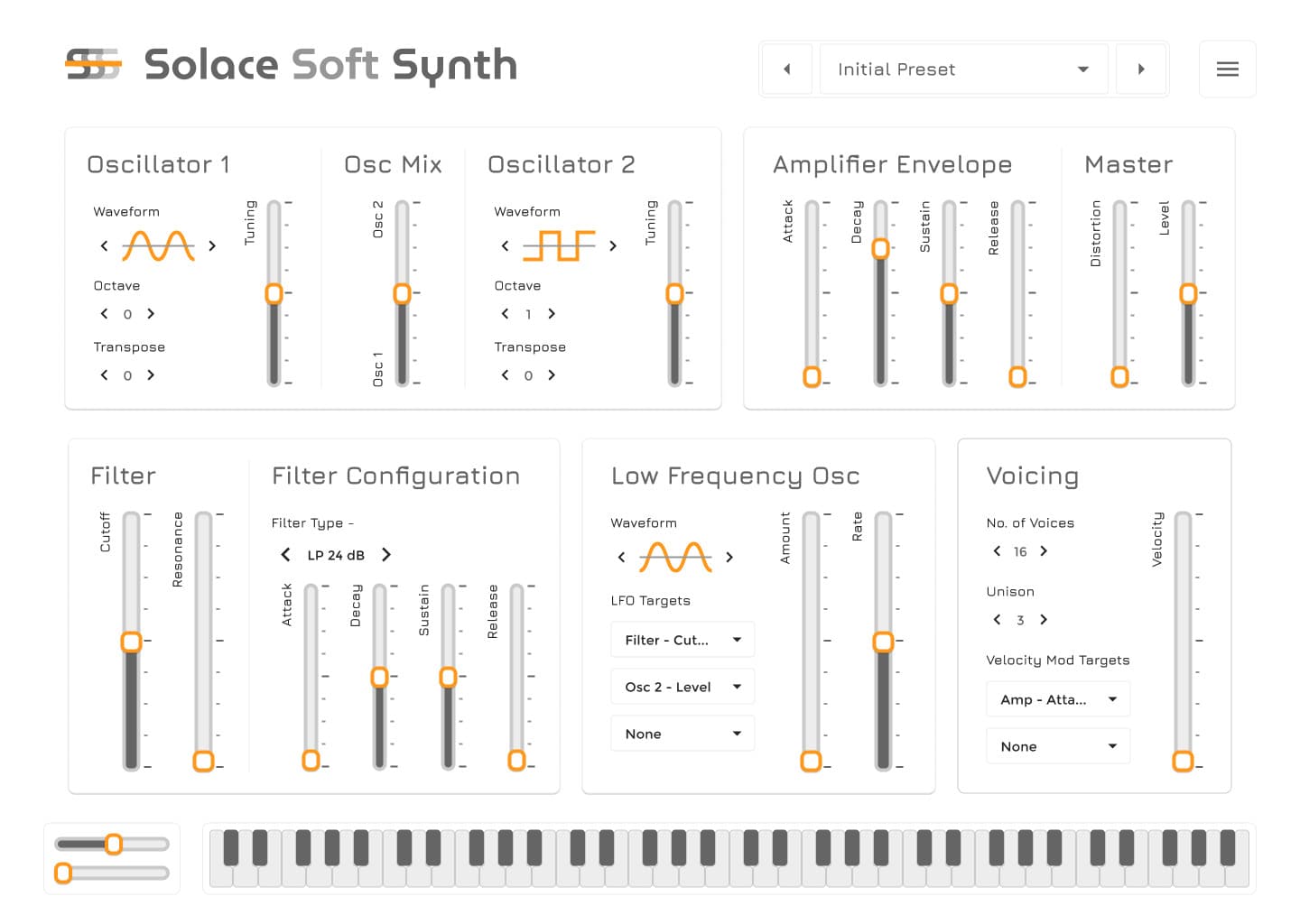
A free, open-source polyphonic software synthesizer built from scratch in C++ with JUCE 8 — outputs as both a VST3 plugin and a standalone application with a modern WebView-based UI.

The audio engine implements a complete subtractive synthesis signal chain: dual oscillators with five waveforms each, a state-variable filter with three modes (LP12, LP24, HP12), dedicated ADSR envelopes for both the amplifier and filter, an LFO with three assignable modulation targets, configurable polyphony up to 16 voices, unison with detune, and velocity-sensitive modulation routing. Every parameter is bridged to the UI via atomic reads on the audio thread — zero allocations, zero locks, zero compromises on real-time safety.

The UI uses JUCE 8's native WebView integration (WebView2 on Windows), allowing the frontend to be built entirely in HTML, CSS, and JavaScript while the C++ backend handles all DSP processing. This architecture enabled a collaborative workflow: the UI/UX designer works directly in Figma and translates designs into frontend code, while the audio engine remains a clean C++ layer underneath. The result is a modern, slider-based interface that feels native while being fully customizable.

  • Dual oscillators — Sine, Sawtooth, Square, Triangle, and Noise waveforms with octave, transpose, and fine-tuning controls.
  • State-variable filter — LP12, LP24, and HP12 modes with cutoff, resonance, and a dedicated filter ADSR envelope.
  • LFO modulation — Assignable to three simultaneous targets from a fixed list including filter cutoff, oscillator pitch, and levels.
  • Full ADSR envelopes — Separate amplifier and filter envelopes with per-voice processing and correct voice-stealing behavior.
  • Velocity modulation — Configurable velocity-to-parameter routing with multiple assignable targets.
  • WebView UI architecture — HTML/CSS/JS frontend communicating with C++ DSP via JUCE's native relay bridge. Designed collaboratively with a dedicated UI/UX designer.
  • Outputs as both VST3 plugin and standalone application from a single JUCE codebase.
6,000+Lines of Code
7DSP Modules
16Voice Polyphony
2Output Formats
Solace Synth visual

Screenshots

Tech Stack

C++
JUCE 8
WebView
CMake
DSP
VST3
HTML/CSS/JS